Introduction
Why Are Computer Cables Important?
Wherever wireless technology is quickly becoming the norm today, traditional cables seem to belong to a time gone by. But regardless if it’s for ultimate transmission speeds with gaming consoles, precise color reproduction on professional monitors, or simply stable power supply to desktop computers, varied computer cables are the necessary “nervous system” of our digital lives. They are the all-important mediators, linking devices, sharing data and providing power. Bad decisions can cause bottlenecks or — worse still — fry costly equipment. So it makes a great deal of difference to know the differences and to use what is intended.
Purpose and Structure Overview
Many users are confused when it comes to choosing charging cables, there are so many kinds of charging cables on the market. This guide is your ultimate companion to help in making a concise decision and selecting the most optimal cables that will meet your requirements. To stay true to our readers’ needs for useful and understandable information
we are going to sidestep the cryptic technical gibberish. In ten separate chapters, we will carefully explore the definition, advantages and disadvantages, application field of various types of computer cables — video cable, data cable and power cord. After that, we’ll give you some actionable buying advice and also answer asked questions so you can confidently control your devices’ digital input connections by the time I’m done.
Chapter 1: VGA Cable (Video Graphics Array)
- Definition and Purpose:
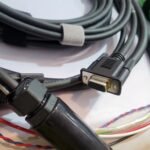
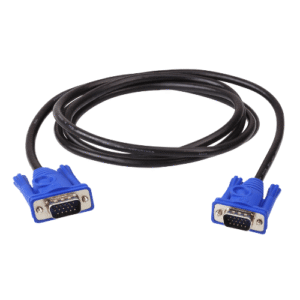
VGA is an analog video transmission standard featuring a blue connector with 15 pins. It was once the standard configuration for connecting computer hosts to monitors, specifically designed for transmitting analog video signals.
- Advantages and Disadvantages:
- Advantages: Exceptional compatibility, still found on numerous older monitors, projectors, and motherboards.
- Disadvantages: As an analog signal, it is highly susceptible to electromagnetic interference, causing blurred images or “ghosting.” Its supported resolutions and refresh rates are limited, failing to meet current high-definition (1080p) and higher quality demands.
- Suitable Scenarios:
Primarily used for connecting older computer equipment, commercial projectors, or as a backup option near devices lacking digital interfaces. For users prioritizing high image quality, VGA has largely been phased.
Transitioning from the analog era of VGA, digital interfaces began taking center stage, with DVI emerging as one of the most significant pioneers.
Chapter 2: DVI Cables (Digital Visual Interface)
- Definition and Purpose:
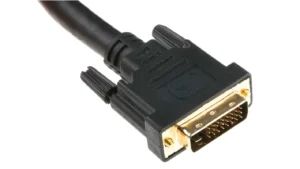
DVI was developed to replace VGA and transmits higher quality digital video. One of its most common uses is to connect a computer to a monitor, search on Amazon However, DVI mainly comes in three types: DVI-D (digital only), DVI-A (analog only), and DVI-I (both digital and analog combined) with the majority of connectors having white colored plastic.
- Advantages and Disadvantages:
- Pros: Through digital transmission VGA actually bring the signal weakening and interference, making you enjoy higher resolution that provides users with an ultra-clear screen.
- Cons: Most DVI versions are the video only type and do not carry audio. The plugs are bulky and all the different types can be daunting too.
- Applications:
Meanwhile, DVI is still prevalent in corporate computers and professional displays in which audio signals are not needed. In fact, it’s a fine option for users with DVI enabled graphics cards and displays.
But with the increasing necessity for home entertainment, an interface is needed that can carry both audio and video simultaneously, this was HDMI.
Chapter 3: HDMI (High Definition Multimedia Interface) Cables
- Definition and Purpose:
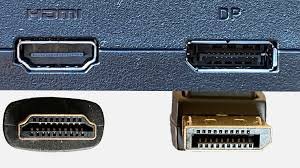
HDMI is the most popular high-definition audio-video cabling solution for consumer electronics today, capable of transmitting both uncompressed digital video and multi-channel audio. It is commonly found in devices such as televisions, computers, gaming consoles, and Blu-ray players.
- Advantages and Disadvantages:
- Pros: Easy to use, one cable does all for both video and audio. Developing (HDMI) The HDMI technical specifications define the protocols, signals, electrical interfaces and mechanical requirements of the connector,[13] but not the features of specific products.[14] The many components are developed concurrently and continuously as new technologies emerge.
- Cons: Cable signal may degrade over long distances (over 5 meters) – you will need to use signal boosters or better fiber optic HDMI cables.
- Suitable Scenarios:
Perfect for almost all modern A/V equipment such as TV’s, monitors, game consoles and home theater system.

With video interfaces changing, so too do the ports used for peripheral devices such as keyboards and mice.
Chapter 4: PS/2 Cables
- Definition and Purpose:
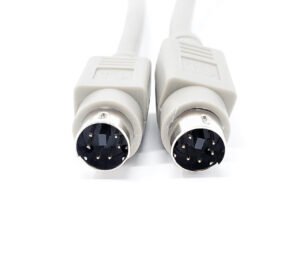
PS/2 is an interface developed in the 1980s specifically for connecting keyboards (purple) and mice (green). It features a circular 6-pin connector.
- Advantages and Disadvantages:
- Advantages: Supports “N-Key Rollover,” earning it a reputation among professional typists and hardcore gamers. Communicates with the system via interrupts, theoretically offering more direct response than USB.
- Disadvantages: Does not support hot-plugging (i.e., connecting/disconnecting devices while the system is powered on). The connector colors are fixed. It has largely been replaced by USB.
- Applicable Scenarios:
Now primarily found in older computers, servers, or specific mechanical keyboard models. For most modern users, it is no longer necessary.
Next, we turn our attention to the core of the network world—Ethernet cables.
Chapter 5: Ethernet Cable
- Definition and Purpose:
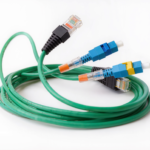
Ethernet cable, commonly known as “network cable,” connects devices such as computers, routers, and switches to wired networks. It uses RJ-45 connectors for connection.
- Advantages and Disadvantages:
- Advantages: Offers more stable, faster, and lower-latency network connections than Wi-Fi, making it ideal for online gaming, large file transfers, and high-definition streaming.
- Disadvantages: Physical cabling restricts device mobility.
- Suitable Scenarios:
Any scenario requiring stable, high-speed network connectivity, such as desktop computers, smart TVs, gaming consoles, and network-attached storage (NAS) devices. Common classifications like Cat5e, Cat6, and Cat7 represent different transmission speeds and bandwidths; users should select based on their network bandwidth requirements.

Beyond visual and network experiences, auditory experiences are equally important.
Chapter 6: 3.5mm Audio Cable
- Definition and Purpose:
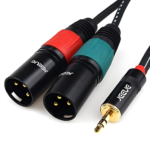
This is the quintessential analog audio interface, named more often than not simply as “the headphone jack.” It sends and receives stereo audio signals, connecting headphones, microphones, speakers, and sound cards for computer.
- Advantages and Disadvantages:
- Pros: Very high compatibility, works with most standard audio equipment.
- Cons: Analog signals are more prone to interference, thus playing roles in reducing sound quality. On many smartphones, it has been replaced with either USB-C or Lightning ports in recent years.
- Applications:
Connect the majority of headphones to their car Stereo, home stereo or portable speaker system.

In the world of data and these kind of stuff USB is a king.
Chapter 7: USB Cables (Universal Serial Bus)
- Definition and Purpose:
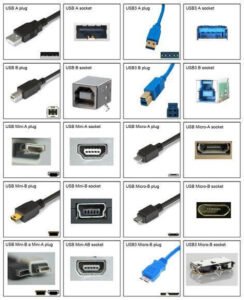
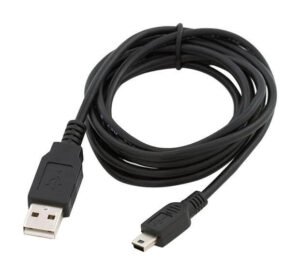
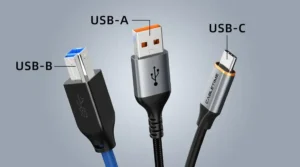
USB is a universal serial bus standard used to connect and power various external devices such as mice, keyboards, printers, portable hard drives, and smartphones. It features multiple physical form factors (Type-A, Type-B, Micro-USB, etc.) and technical specifications (USB 2.0, 3.0, 3.2, USB4).
- Advantages and Disadvantages:
- Advantages: Highly versatile, supports hot-plugging, and combines data transfer with charging capabilities. Newer standards (like USB4) offer extremely high speeds.
- Disadvantages: The multitude of interface types and versions can cause confusion (e.g., a single USB-C port may support different transfer protocols).
- Applications:
Covers nearly all peripheral connections and portable device charging scenarios, making it one of the most essential interfaces in modern computers.
Of course, all devices fundamentally rely on power supply.
Chapter 8: Computer Power Cables
- Definition and Purpose:
Computer power cables connect AC power from wall outlets to the power supply unit (PSU) of desktop computers or the adapter of laptops.
- Advantages and Disadvantages:
- Advantages: Provides stable, high-power electricity supply, essential for running high-performance devices.
- Disadvantages: Multiple standards exist, with different plug specifications across countries and regions. Cable quality varies significantly, and substandard cables pose safety hazards.
- Applications:
Supplies power to desktop computers, monitors, printers, and certain laptop adapters.

As technologies converge, a new, integrated interface is emerging to unify the market.
Chapter 9: Thunderbolt 3 / USB-C
- Definition and Purpose:
USB-C is a physical form factor that features a rotating-style connector the size of micro-USB. Thunderbolt 3 features twice the speed of Thunderbolt 2 and delivers up to 40 Gbps for performance that fits neatly into your bottom line. A single cable from your notebook provides up to 40Gbps of video bandwidth, enough to daisy-chain two 4K monitors so you can play fullscreen while using all your USB claims.
- Advantages and Disadvantages:
- Pros: Very versatile, a single cable can serve as data cable, video cable and power cord for desktop applications.
- Cons: Not all USB-C ports are the same — not every one supports Thunderbolt 3. This discrepancy can be confusing for some users. They also command a high price for thunderbolt 3 cables and devices.
- Suitable Scenarios:
Contemporary premium and high-performance laptops (like Apple Macbook series), professional workstations as well as high-end external devices (graphic boxes, article all flash storages).
Next let’s take a look at the professional side of HDMI’s great foe.
Chapter 10: DisplayPort
- Definition and Purpose:
DisplayPort (abbreviated as DP) is another high-definition digital audio/video transmission interface, primarily promoted by the Video Electronics Standards Association (VESA). It is highly popular in the PC field, especially in professional graphics and gaming applications.
- Advantages and Disadvantages:
- Advantages: Typically offers higher bandwidth than HDMI of the same generation and supported high resolutions and refresh rates earlier. Natively supports multi-display daisy chaining, allowing a single cable to connect from the computer to the first monitor, which then connects to the second.
- Disadvantages: Less prevalent than HDMI in consumer electronics (e.g., televisions).
- Suitable Scenarios:
PC gamers (seeking high refresh rates), professional graphic designers, and users requiring multi-monitor work environments.
More About Cables
Cable Selection Criteria
- Confirm Connectors: First, check the connector types on both devices you wish to connect.
- Define Requirements: Are you transmitting 4K/120Hz gaming visuals, or is it for everyday office use? Your needs determine the technical standards the cable must support (e.g., HDMI 2.1 or DisplayPort 1.4).
- Consider Length and Quality: Measure the required length and allow extra slack. For long distances or high-bandwidth transmission, choosing a reliable brand cable is crucial.
Frequently Asked Questions
- Q: Do more expensive HDMI cables deliver better picture quality?
A: Within reasonable lengths, digital signal transmission quality remains virtually identical as long as the cable meets the required technical standard (e.g., “High Speed” or “Ultra High Speed”). Premium cables often offer more “mystical” benefits than tangible performance gains.
- Q: Can I use adapters?
A: Yes, but adapters follow the “weakest link” principle—overall performance is determined by the least capable component in the chain. For example, converting from DVI to VGA degrades the signal to analog format.
Future Trends
Looking ahead to 2026 and beyond, computer cables will evolve toward higher bandwidth and greater functional integration. USB4 v2.0 (reaching speeds up to 80Gbps) and next-generation DisplayPort standards will significantly enhance data and video transmission capabilities. The USB-C port will continue to unify the market, becoming the standard configuration for the vast majority of devices. Meanwhile, advancements in wireless technologies like Wi-Fi 7 will challenge wired connections in more scenarios. However, for professional fields demanding ultimate stability and speed, physical cables remain irreplaceable in the foreseeable future.
Conclusion
From VGA, which could only transmit analog video, to HDMI and DisplayPort integrating both audio and video, and further to Thunderbolt/USB-C unifying data, video, and power delivery, the evolution of computer cables epitomizes a concise history of technological convergence and performance leaps. Each cable type has played a pivotal role in its specific era and application. This guide clearly demonstrates that selecting the right cable is essential to unlocking a device’s full potential. An incompatible cable may prevent your 4K monitor from achieving its intended clarity or significantly reduce the transfer speed of your high-speed solid-state drive. We hope this comprehensive guide clears up any confusion. Next time you face a tangled mess of cables, you’ll confidently identify each one and select the perfect connection partner for your devices based on your specific needs. This will help you build a more efficient and tidier digital workspace and entertainment environment.
Furthermore, we ensure we work with your required specification. Our services are top-notch. If you need help with your cable, feel free to contact us.