Introduction
Definition of DVI Cables
DVI, short for Digital Visual Interface, is a video display interface standard introduced in the late 20th century. It was designed to replace the then-dominant but limited-quality VGA (Video Graphics Array) analog interface. By transmitting high-quality digital video signals, it delivers clearer and more stable images for devices such as personal computers, monitors, and projectors.
The Importance of DVI Cables
Although HDMI and DisplayPort dominate the market in 2026, the value of DVI cables remains significant. Globally, hundreds of millions of monitors, computer graphics cards, and projection devices still feature DVI interfaces. For users needing to connect these “long-serving” legacy devices or those prioritizing signal stability in specific industrial or medical fields, DVI remains a reliable and cost-effective choice. Understanding it means mastering the bridge connecting the old and new digital worlds.
Purpose and Structure Overview
This article aims to provide you with a comprehensive, authoritative, and easy-to-understand ultimate guide to DVI cables. We begin with DVI’s history and functionality, delve into its various formats (DVI-D, DVI-A, DVI-I) and link types (Single-Link and Dual-Link), and teach you how to easily identify and select the right cable. Finally, we address common questions to help you precisely find the DVI cable best suited to your needs.
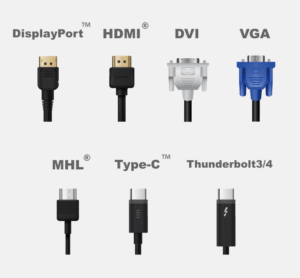
Regarding DVI Cables
Background information on DVI cables
The DVI protocols and specifications were set by the Digital Display Working Group in 1999. Its main purpose was to develop a standard digital interface to transmit video signals from a graphics card to display devices with no loss. The rise of it brings about the substantial leap in PC display quality and lays a solid foundation for widespreading digital video interfaces later. It has largely been succeeded by HDMI and DisplayPort, but is still in use, having seen widespread adoption on most modern PC video cards and monitors.
Basic Features and Uses of DVI Cords
Function Connect your DVI equipped device to flat panel displays, digital CRT displays, projectors and HDTV with DVI-D Dual Link interface for video transfer. They are popular in office/home/ article source graphics computers, video surveillance equipment, and HTPC (home theater PC)/embeded systems. They feature a strong screw-locking design that will keep your connection secure, making them perfect for applications that require jacks to be protected from inadvertent disconnections.
Pros and Cons of DVI Cables
Knowing the strengths and weaknesses of DVI is important in selecting its uses.
Advantages:
- Sharp, Crisp Video: Instead of using digital-to-analog conversion like other interfaces, DVI-VGA adapter connects only the video signal from a computer with DVI to a display with VGA for more vivid pictures.
- High Compatibility:The DVI-I interface is compatible with both digital and analog signals,Easy adapter for your new devices.
- Solid Cable Connection: Wing screws on both sides hold the connector in place ensuring that there is no loss of quality due to cable looseness.
Disadvantages:
- Not Audio Support: DVI interface do not carry audio to monitor with in-built speaker.
- Bulky: DVI connectors are quite bulky, particularly in comparison to the compact HDMI and DisplayPort.
- Bandwidth Constraints: Even the dual-link DVI standard can’t hold a candle to the bandwidth of HDMI 2.1 or DisplayPort 2.0, and it therefore struggles to support resolutions over 4K, let alone high refresh rates.
Different DVI Formats
The most confusing aspect of DVI lies in its multiple formats, but understanding its naming logic makes it easy to grasp. The key is identifying the type of signal it transmits.
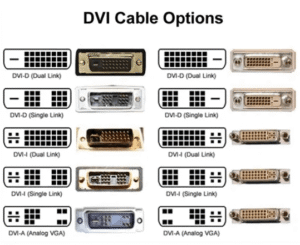
DVI-D (Digital Signal)
The “D” in DVI-D stands for Digital. This type of interface and cable transmits only pure digital signals. Its pin configuration features a distinctive flat pin surrounded by no additional analog signal pins. This is currently the most common DVI type, suitable for connecting all devices supporting digital input.
DVI-A (Analog Signal)
The “A” in DVI-A stands for Analog. This interface is extremely rare, transmitting only analog signals—essentially a “DVI-wrapped” version of VGA. Its pin layout features a cross-shaped configuration, lacking the flat pin found in DVI-D.
DVI-I (Digital and Analog Signals)
The “I” in DVI-I stands for Integrated. This is a versatile interface integrating both digital and analog signal pathways. Visually, its pins include both the flat connector of DVI-D and the four analog signal pins of DVI-A. This allows DVI-I to connect to DVI-D displays (using digital signals) or to VGA displays via a simple DVI-to-VGA adapter (using analog signals).
Applicable Scenarios and Compatibility for Various Formats
The core principle of compatibility is: digital to digital, analog to analog.
- DVI-D (Source) → DVI-D/DVI-I (Display): Works, transmits digital signals.
- DVI-I (Source) → DVI-D (Display): Works, transmits digital signals.
- DVI-I (source) → DVI-I/DVI-A/VGA (display): Works, transmits analog signal (requires adapter for VGA connection).
- DVI-D (source) → VGA (display): Does not work. Since DVI-D sources do not output analog signals, simple physical adapters are ineffective.
Single-Link and Dual-Link DVI
Once we’ve figured out whether DVI-D or DVI-I, we now have to think about another important aspect: Single Link vs Dual Link.
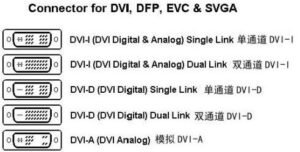
Features and Uses of Single-Link DVITYPES OF CABLE1.
Single-link Single-link DVI employs a single TMDS (Transition Minimized Differential Signaling) link, which provides a maximum bandwidth of 165MHz. This provides enough bandwidth to support resolutions up to 1920x1200pixels at a color depth of 12 bits per pixel at 60Hz. For most 24″ and smaller 1080p or 1200p displays, a single link DVI cable is perfectly sufficient.
Dual-Link DVI Benefits and Uses
As its name indicates, dual-link DVI uses two TMDS data-links to achieve double the data of single-link DVI. This allows for higher resolution support, such as 2560×1600 @60Hz or 1920×1080@120Hz/144Hz. If you have a professional monitor (one that is more than 1920×1200 resolution) or one with higher refresh rates, you want to use a dual link DVI.
Selecting the Right Type of Link
The choice is really simple: just look at the max resolution and refresh rate that your own GPU and monitor can support.
Unless you have a monitor with higher resolution than WXGA/1080p (1920×1200) or faster refresh rate than 60hz, what you need is a single-link DVI cable.
If you have a monitor capable of running higher than 1920×1200 resolution (i.e. and above) or if you need faster refresh rates when using just plain old stereo video gaming at 1080p, then you’re going to need the dual-link DVI cables and dual-link DVI ports.
How to Identify DVI Cables?
Physical Characteristics of DVI Cables
DVI connectors are typically white (sometimes black), rectangular in shape, wider than VGA connectors, and feature wing screws on both sides for securing. The key lies in their internal pin layout.
Methods for Identifying Different DVI Cable Types
- Check pin completeness: Dual-link DVI cables have a full 24 pins (digital section), while single-link DVI cables have a distinct 6-pin gap in the middle.
- Examine the area around the flat pins:
- Flat pins only: This is DVI-D.
- Flat pins surrounded by 4 small pins: This is DVI-I.
- By following these two steps, you can identify the four main types: DVI-D Single-Link, DVI-D Dual-Link, DVI-I Single-Link, and DVI-I Dual-Link.
Common DVI Cable Brands and Models
Numerous DVI cable brands exist on the market, varying in quality and price. Some reputable, widely available brands include Ugreen, Choseal, Philips, Biaze, and UNITEK. Products from these brands typically offer stable quality and reliable after-sales service. Price-wise, a standard 1.5-meter to 3-meter DVI cable generally ranges from tens to several dozen RMB, offering excellent value for money. For instance, Biaze’s DVI cables are well-regarded for their reliable performance and affordable pricing.
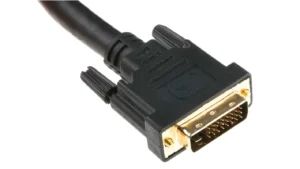
Where Can I Buy DVI Cables?
Online Purchasing Channels
Major e-commerce platforms like JD. com, Taobao, Tmall and Amazon are providing the easiest purchase of DVI cables. They boast wide product selections and multiple brands, with the ability to directly price compare and view user reviews.
Physical Store Recommendations
DVI cables can also be purchased at computer malls, large electronic chains (such as Suning or Gome), and occasionally specialized stores selling computer accessories. What is gained with in-store purchase: the ability to inspect cable type and build quality on site, use it once purchased.
Key Considerations When Purchasing
- Check Connector Interface Type: Before purchasing this DVI-D to VGA adapter, it’s important for you to make sure your Video card supports DVI-D port. And the DVI port is a digital input, and the VGA port is an analog output. If your devices don’t have DVI ports but have HDMI instead, please use a micro HDMI to HDMI cable for connection. And if you need a direction for single link output or dual link output, just contact us directly after. If not compatible or the quality is not as expected, please return to sender if fulfilled by.
- Choose the Right Length Measure the distance between your equipment, add a little extra for slack in case you need to move things around, and don’t get too much extra as longer wires can add time and signal loss.
- Check User Reviews – When you shop online, look for reviews on other buyer’s experiences, especially about the signal longevity and durability.
Key Factors to Consider When Selecting Custom DVI Cables
For users with specialized requirements, the following points should be considered when choosing high-quality or custom DVI cables.
Length and Specifications
Standard copper DVI cables typically have an effective transmission distance of around 5 meters. Signals may experience attenuation beyond this length. For long-distance transmission exceeding 15 meters, consider using active cables with signal amplifiers or higher-cost but more effective fiber optic DVI cables. The latter can reliably transmit signals up to 100 meters.
Materials and Quality
Cable materials directly determine performance and lifespan.
- Conductors: Prioritize cables using high-purity oxygen-free copper (OFC) conductors for superior conductivity and signal integrity.
- Shielding: Premium cables employ multi-layer shielding, such as aluminum foil combined with high-density braided mesh, to effectively resist electromagnetic interference (EMI) and ensure signal purity.
- Gold-Plated Connectors: Gold-plated connector pins resist oxidation and withstand repeated insertion/removal, guaranteeing stable, reliable long-term contact.
Price and Value for Money
While DVI cables are generally affordable, one should avoid solely chasing the lowest price. A well-crafted cable with solid materials (typically priced between 30-50 yuan) delivers longer-lasting, stable performance, preventing frustrations from signal flickering or disconnections. For critical applications, this represents a worthwhile investment.
Frequently Asked Questions
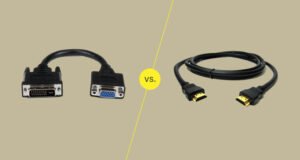
DVI vs HDMI Cables
There are three important differences between them: 1) Perhaps the most obvious, HDMI includes both audio and video in one cable; however this does not have any effect on their performance, regardless of what people may think. 2) Size of the Connector HDMI connectors are smaller. 3) Functionality: The newer versions of HDMI will also provide you with other functionality like networking, 3D, and HDR as well as bandwidth by far greater than that of DVI. Nevertheless, DVI-D and video-compatible HDMI are limited to the same 165 MHz single-link DVI maximum bandwidth and will display. interchangeably on widescreen monitors with a resolution of 1920 × 1200 or less.
Maximum Distance Transmission for DVI Cables
For passive copper DVI cables, the reliable distance for most applications is not more than 5 meters. Some good quality cables can go up to 15m but then signal loss may be an issue. For distances up to 20m, each end of the DVI signal line should be connected to a repeater (or fiber) for long haul DVI transmission.
Will DVI Cable Transmit Audio?
Basic DVI lacks any support for audio. Accordingly, you need to connect an extra audio cable if using DVI input.
Conclusion
As the pioneer connecting the digital display era, DVI cables may no longer lead in technical specifications. Yet, with their outstanding signal quality, robust connections, and extensive device compatibility, they remain indispensable in 2026. They serve not only as the link to legacy equipment but also as a stable and reliable solution for many specialized applications.
The future trajectory for DVI is gradual obsolescence, with newly manufactured consumer-grade graphics cards and monitors rarely featuring DVI ports. Nevertheless, DVI interfaces and cables will retain relevance for the next 5-10 years in industrial control systems, the used equipment market, and specialized fields requiring specific resolutions.
We hope this comprehensive guide has provided you with a thorough understanding of DVI cables. When selecting a cable, carefully verify your device’s interface type (DVI-D/I), required resolution and refresh rate (single/dual link), and choose a cable with high-quality materials and appropriate length based on your budget and application scenario. The right choice will ensure your equipment delivers optimal display performance, providing you with a clear and stable visual experience.
Go for high-quality cable assemblies and wiring harnesses. Jinhai offers you the best solution for wire assemblies.